
Milestone Billing Software for Freelancers
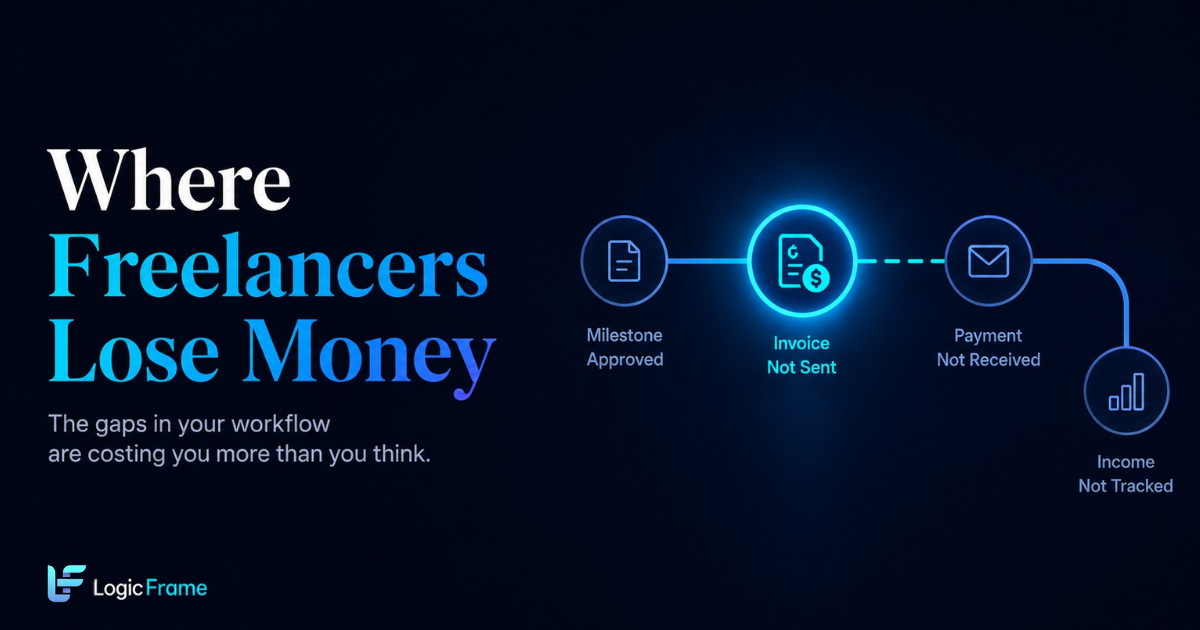
Freelancers lose money in the gap between finishing a milestone and getting paid. Here's why it happens, and the milestone billing system that closes it.
You finish the milestone. The client approves it, maybe even sends a quick "looks great!" You feel that small hit of relief, close the tab, and move straight into the next task on your list.
Three weeks later, you're doing a random check of your bank account and it hits you: you never actually sent the invoice.
If that's happened to you, it's not because you're bad at admin. It's because nothing in your process forced the next step to happen. And that one gap — the space between finishing work and getting paid — is where freelancers quietly lose the most money, time, and trust.
This isn't really about "invoicing." It's about milestone billing: getting paid at defined checkpoints throughout a project instead of waiting until the very end, and making sure each checkpoint actually converts into cash instead of sitting forgotten in a to-do list.
Why This Keeps Happening (It's Not a Discipline Problem)
Here's the mechanic nobody talks about: a normal freelance project runs through five separate stages — proposal, milestone tracking, invoicing, payment follow-up, and bookkeeping — and each one usually lives in a different tool. A proposal doc here, a project tracker there, an invoicing app somewhere else, a spreadsheet for your books.
The only thing connecting those five tools is a human being remembering to move from one to the next. And every manual handoff is a place where something can get dropped. Not because you're careless — because that's just how handoffs work. The more times a task has to pass from "system" to "your memory" and back to "system," the more chances it has to vanish.
Sending an invoice on time has actually become something more freelancers now treat almost like a formal checkpoint — a moment that signals professionalism and keeps trust intact with the client. When that checkpoint gets missed, it's not just late money. It's a small crack in how reliable you look.
So the fix isn't "try harder to remember." It's removing the step where remembering is required at all.
What a Leak-Proof Milestone Billing System Actually Looks Like
If you strip away the tool names and just look at the pattern, a system that doesn't leak money looks like this: every event automatically triggers the next one, instead of waiting for you to notice and act.
How to trigger an invoice the moment a milestone is approved
The standard freelance pattern is: milestone gets approved → you remember to open your invoicing tool → you rebuild the invoice from scratch → you send it whenever you get around to it. Every one of those middle steps is optional friction.
A milestone billing setup removes the middle: the approval event itself generates the invoice, pre-filled with the milestone amount, and sends it immediately. No remembering, no rebuilding. The invoice exists before you've even switched tabs.
Why chasing payment shouldn't be manual either
Invoicing the moment work is done only solves half the leak. The second half is what happens after you send it. Most freelancers either chase late payments with awkward one-off emails, or — more commonly — don't chase at all, because it feels uncomfortable and easy to put off.
A working system handles this with an escalating, automatic sequence: a friendly reminder a few days after the due date, a firmer one a week later, a final notice if it's still unpaid — and it stops the moment payment lands. You're not the one deciding when to send an awkward email. The system just runs the sequence.
Where the money actually goes
Getting paid is still only two-thirds of the leak. The third piece is what happens to that payment afterward. Plenty of freelancers get paid and then never properly record it against the right client or project — so weeks later, they genuinely don't know what their real income looks like, because it's scattered across bank statements and half-updated spreadsheets.
Closing this gap means the moment a payment is confirmed, it's automatically logged against the right project, and your running income and expense picture updates itself. No separate bookkeeping session required.
The leak most systems don't even try to close: scope creep
Here's the one almost nobody automates. A client asks for "just one small change." Then another. Each one feels too minor to bring up as an extra cost, so you just do it. By the end of the project, you've done real, unpaid extra work — and you have no record of it to point to if you ever wanted to bill for it.
Closing this leak means logging every out-of-scope request the moment it happens, tagging it against the original agreement, and having a clear, quotable trail if you decide to bill for it — instead of a vague memory of "I did a bunch of extra stuff."
Milestone Payment Schedule: A Real Example
If you're structuring milestone billing for the first time, here's a standard breakdown freelancers use to protect their cash flow instead of waiting until the very end to get paid:
| Milestone | % of Total | Trigger |
|---|---|---|
| Signed agreement / deposit | 20–30% | Contract signed |
| First deliverable (wireframes, discovery doc, etc.) | 25–30% | Client approval |
| Mid-project delivery (build, draft, revision round) | 25–30% | Client approval |
| Final delivery | 20–25% | Final handoff |
Splitting payment this way means you're never carrying the full financial risk of a project until the last day. If a client disappears mid-project, you're not left having done 80% of the work for 0% of the pay.
Quick Self-Check: Does Your Workflow Have a Leak?
Run through these honestly:
- Have you ever finished a milestone and sent the invoice more than 3 days later?
- Do you manually track which invoices are paid versus outstanding?
- Have you done unpaid "quick changes" outside the original scope in the last month?
- Do you update your income and expense records separately from your invoicing?
- If a client paid you today, would you notice within the hour?
If you checked more than one of these, the issue isn't your discipline. It's the number of manual handoffs sitting in your process. Every checked box is a place where a human has to remember to do something a system could just do automatically.
Closing the Gap
You can patch each of these leaks individually — a milestone invoicing tool here, a payment reminder app there, a separate spreadsheet for your books. Plenty of freelancers do exactly that, and it works, sort of, until one of the handoffs between tools gets missed.
Or you can run them as one connected sequence, where finishing a milestone is the only action you take — everything after that (the invoice, the reminders, the bookkeeping, the scope tracking) happens on its own.
That's the actual difference between "I have invoicing software" and "I don't lose money in the gap between finishing work and getting paid."